




If you have spent any amount of time tinkering with your Android phone, you know the holy grail of independent software is the APK. It is the file that lets you bypass corporate walled gardens and install whatever you want. But if you read Google’s developer guidelines back in 2021, they loudly declared that the APK was being replaced by a shiny new format called the Android App Bundle (AAB).
Fast forward to May 8, 2026. Despite Google’s best efforts to mandate the AAB format on the Play Store, the classic APK file is not just surviving; it is thriving in the golden age of sideloading.
If you are confused about why there are two different file formats for Android apps, or why open-source developers refuse to let the classic APK die, grab a coffee. Here is a factual, jargon-light breakdown of the software war happening right on your smartphone.
What is the Actual Difference?
To understand the drama, you need to understand how your phone actually installs software.
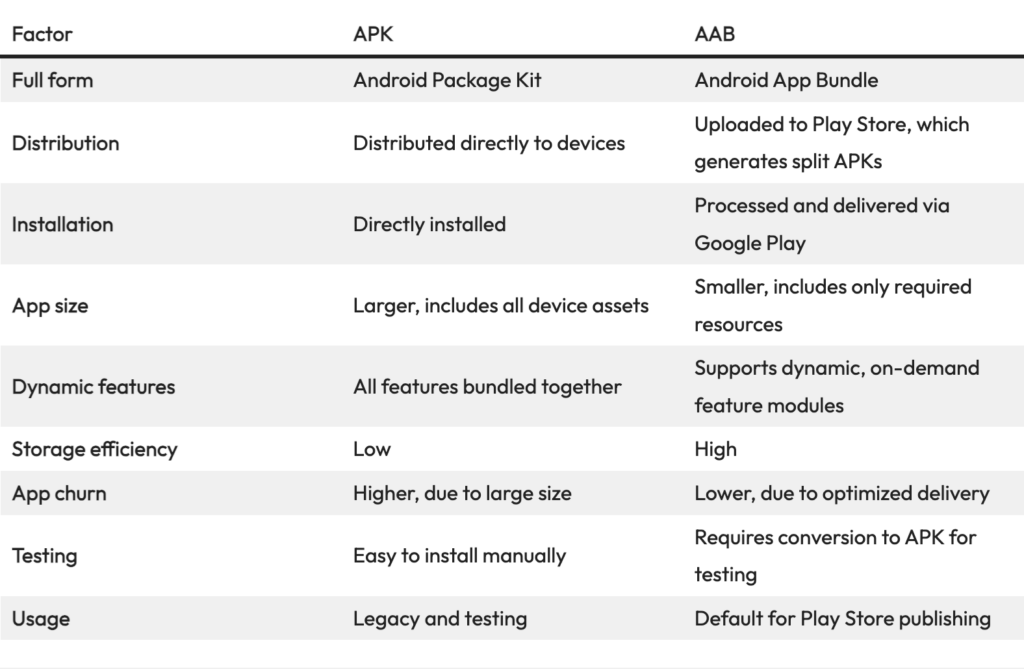
The Classic APK (Android Package Kit): Think of an APK as a giant, all-inclusive suitcase. When a developer builds an app, they throw everything into this one file—the code, the high-resolution images for massive tablets, the low-resolution images for budget phones, and the language packs for English, Spanish, and Japanese. When you install an APK, you download the entire suitcase, even if you only need a few shirts from inside it.
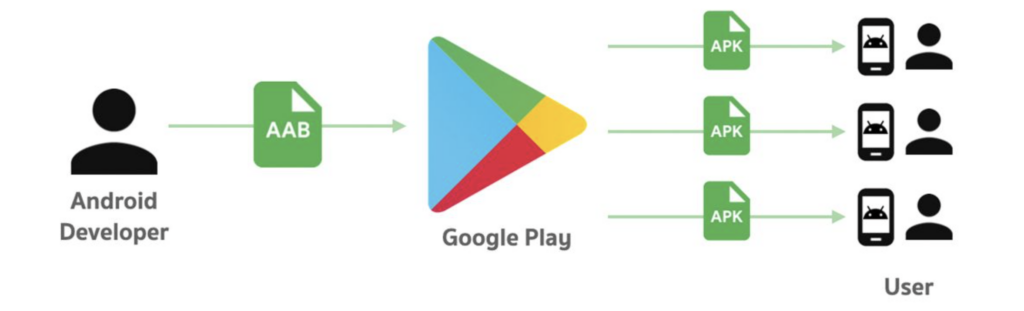
The Modern AAB (Android App Bundle): Google created the AAB to solve the “heavy suitcase” problem. An AAB is not an installable file; it is a publishing format. A developer uploads the massive AAB to the Google Play Store. When you hit “Install” on your phone, Google’s servers analyze your specific device. Google unpacks the AAB, pulls out only the specific code and image sizes your phone needs, and sends a custom, miniaturized “Split APK” to your device.
“An AAB is basically a restaurant menu that you hand to Google Play. You cannot eat the menu. Google reads the menu, cooks exactly what your specific phone ordered, and serves it as a custom APK.”
Why Google Mandated the AAB
Google did not create the AAB just to annoy developers. From a purely technical standpoint, App Bundles offer some massive, factual benefits for standard users.
- Storage Space: Because Google strips out the files your specific phone does not need, apps downloaded via AAB are typically 15% to 35% smaller than universal APKs. This is a lifesaver if your phone is constantly running out of storage.
- Faster Downloads: Smaller file sizes mean you are not wasting mobile data downloading 4K tablet graphics to a standard 6-inch smartphone screen.
- Security Control: To use an AAB, developers must use “Play App Signing,” meaning Google holds the cryptographic keys to the software, adding a layer of corporate security against tampering.
The Sideloading Rebellion: Why the APK Refuses to Die
If AABs are so efficient, why are Android power users and independent developers in 2026 completely ignoring them? It comes down to one word: Freedom.
Because an AAB file cannot be directly installed on an Android device without a distributor (like Google Play) processing it first, it inherently locks developers into Google’s ecosystem.
Here is why the classic standalone APK is experiencing a massive renaissance today:
1. Sideloading and Third-Party Stores
Thanks to massive global regulations like the EU’s Digital Markets Act (DMA), third-party app stores are booming. Stores like F-Droid, the Epic Games Store, and AltStore do not always have the massive server infrastructure to dynamically process AAB files on the fly. A universal APK is a simple, plug-and-play file that works flawlessly on alternative stores.
2. Bypassing “Play App Signing”
Many open-source developers categorically refuse to hand over their cryptographic signing keys to a massive tech corporation. By sticking to traditional APKs, developers maintain 100% control over their software’s security and distribution without Google acting as the middleman.
3. Archival and Downgrading
If a developer ruins an app with a terrible UI update on the Play Store, you cannot easily roll back an AAB. Because the APK is a standalone, offline file, communities can easily archive older versions of apps on sites like APKMirror. If you want the 2024 version of your favorite music player, you simply download the old APK and install it.
The 2026 Developer Compromise
| Feature | Android App Bundle (AAB) | Universal Package (APK) |
| Primary Use | Google Play Store mandatory uploads | Sideloading, F-Droid, direct website downloads |
| Installable Offline? | No, requires a server to generate the app | Yes, installs instantly without an internet connection |
| File Size | Highly optimized and small | Larger, contains assets for all devices |
| Developer Control | Google manages the signing keys | Developer manages their own signing keys |
The Bottom Line
Google’s AAB format is an incredibly smart piece of engineering that saves millions of gigabytes of bandwidth every day. If you only ever download apps from the Google Play Store, AABs are making your life better without you even realizing it.
However, the classic APK file is the MP3 of the Android world. It is universally understood, incredibly portable, and refuses to be locked down by corporate restrictions. As long as Android users value the freedom to install whatever they want, the bulky, traditional APK is never going away.